Video Content Creation for LED Effects: Complete 2026 Guide
Video Content Creation for LED Effects: Complete 2026 Guide

Creating video content for LED displays requires specialized knowledge of formats, resolutions, and rendering techniques. Whether you’re creating content for LED walls, pixel matrices, or architectural installations, this comprehensive guide will help you produce stunning visual content optimized for LED displays. For a broader look at video effects workflows, see our guide to creating video effects for LED displays.
Understanding LED Video Requirements
LED Display Characteristics
Resolution Considerations
- Pixel Pitch: Distance between LED pixels (2mm-10mm common)
- Viewing Distance: Optimal viewing distance affects resolution needs
- Display Size: Larger displays may require higher resolution
- Content Scaling: How content scales to display size
Color and Brightness
- Color Gamut: LED color reproduction characteristics
- Brightness Levels: High brightness for outdoor use
- Contrast Ratio: LED contrast capabilities
- Color Calibration: Accurate color reproduction
Refresh Rate and Timing
- Refresh Rate: 60Hz+ for smooth video
- Response Time: LED switching speed
- Frame Rate: Content frame rate matching
- Latency: Processing and display latency
Video Formats for LEDs
Common Formats
- MP4/H.264: Most compatible, good compression — read our MP4 vs AVI comparison for LED software for a detailed format breakdown
- AVI: Uncompressed or lightly compressed
- MOV: Apple ProRes support
- MKV: Container format flexibility
Codec Selection
- H.264: Best compatibility and compression
- H.265/HEVC: Better compression, newer standard
- ProRes: Professional editing codec
- DNxHD: Avid professional codec
Resolution Standards
- HD: 1920x1080 for standard displays
- 4K: 3840x2160 for high-end installations
- Custom: Non-standard resolutions for specific LED matrices
- Pixel Perfect: Match exact LED matrix resolution
Content Creation Software
Professional Video Software

Adobe After Effects
- Motion Graphics: Professional motion graphics creation
- Visual Effects: Advanced visual effects capabilities
- Integration: Works with other Adobe products
- Rendering: Multiple format and codec options
Blender
- 3D Animation: Free 3D animation and rendering
- Video Editing: Built-in video editing capabilities
- Scripting: Python scripting for automation
- Export Options: Various format and resolution options
DaVinci Resolve
- Color Grading: Professional color correction
- Editing: Professional video editing
- Fusion: Visual effects and compositing
- Delivery: Multiple export formats
Specialized LED Software
- Pixel LED Animator 3: LED-specific content creation
- Madrix: Professional LED control and content
- TouchDesigner: Real-time visual generation
- Resolume: VJ and live performance software — see our VJ video effects guide for a full overview of Resolume workflows and VJ performance techniques
Our Pixel LED Animator 3 Software
Key Features
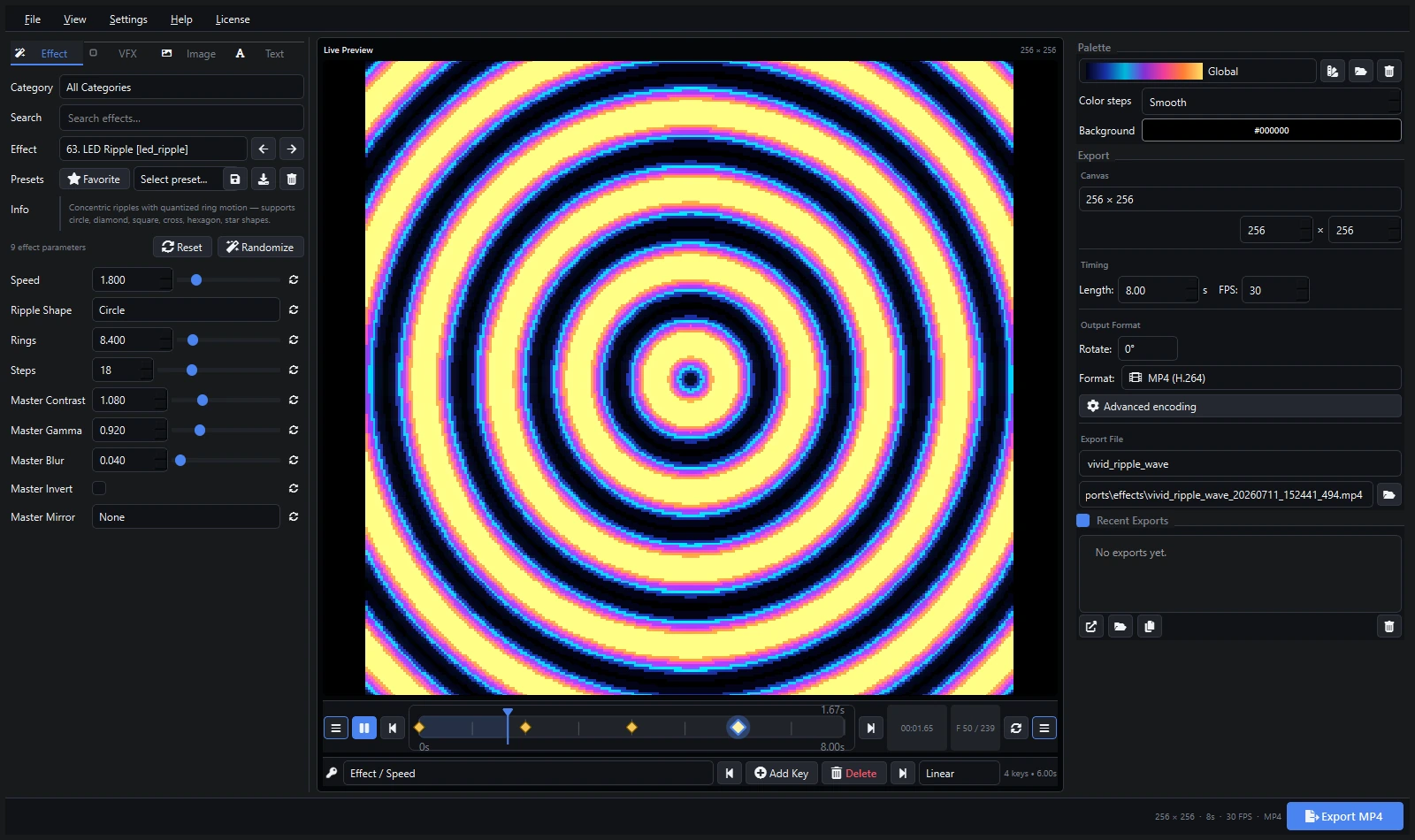
- LED-Specific Design: Interface designed for LED content
- Real-time Preview: See content on simulated LED display
- Multiple Export Formats: SWF, AVI, MP4, image sequences
- Effect Library: Built-in effects and templates
- Audio Integration: Audio-reactive content creation
Workflow Benefits
- Streamlined Process: LED-optimized workflow
- Time Savings: Faster content creation
- Professional Results: High-quality output
- Easy Learning: Intuitive interface
Export Capabilities
# Export Options in Pixel LED Animator 3
- SWF: For LED controllers with SWF support
- AVI: Uncompressed or lightly compressed
- MP4: H.264 for maximum compatibility
- Image Sequences: PNG, JPEG for frame-by-frame control
- Custom Resolutions: Match any LED matrix
Content Creation Techniques
Motion Graphics for LEDs
Design Principles
- Bold Graphics: Simple, bold designs work best
- High Contrast: Strong color contrast for visibility
- Limited Detail: Avoid fine details that get lost
- Movement: Dynamic motion for engagement
Color Strategies
- Primary Colors: Strong primary colors work well
- Color Palettes: Consistent color schemes
- Brightness Variation: Use brightness for depth
- Saturation: High saturation for impact
Animation Techniques
- Smooth Transitions: Gradual changes between states
- Looping Content: Seamless loops for continuous play
- Timing: Appropriate speed for viewing distance
- Accent Motion: Subtle motion for interest
3D Content for LEDs
3D Modeling Considerations
- Simplified Models: Low-poly models for performance
- Lighting: Strong lighting for visibility
- Camera Work: Camera angles optimized for LED viewing
- Rendering: Settings optimized for LED displays
Animation and Rigging
- Simple Rigs: Avoid complex bone structures
- Keyframe Animation: Straightforward keyframe animation
- Physics: Simple physics simulations
- Particle Effects: Bold particle systems
Rendering Optimization
- Resolution: Match LED display resolution
- Format: LED-compatible formats
- Compression: Balance quality and file size
- Performance: Real-time playback considerations
Generative Content
Algorithmic Design
- Mathematical Patterns: Fractals and geometric patterns
- Procedural Generation: Rule-based content creation
- Parameter Control: Adjustable parameters for variation
- Randomization: Controlled randomness for variety
Programming Approaches
- Processing: Creative coding environment
- TouchDesigner: Node-based visual programming
- Custom Scripts: Python or JavaScript automation
- Shader Programming: GLSL shader development
Real-time Generation
- Live Performance: Real-time content generation
- Interactive Elements: User-controlled parameters
- Audio Reactivity: Sound-responsive visuals
- Sensor Integration: External sensor input
Technical Specifications
Resolution and Scaling
Calculating Optimal Resolution
Optimal Resolution = Display Size × Pixel DensityScaling Strategies
- Pixel Perfect: 1:1 pixel mapping
- Integer Scaling: 2x, 3x scaling for sharpness
- Adaptive Scaling: Smart scaling algorithms
- Content Adaptation: Content designed for specific resolutions
Multi-Resolution Content
- Master Resolution: Create at highest needed resolution
- Downscaling: Create lower resolution versions
- Aspect Ratio: Maintain proper aspect ratios
- Quality Preservation: Maintain quality across resolutions
Color Management
Color Spaces
- sRGB: Standard web color space
- Rec.709: Video standard color space
- DCI-P3: Wide color gamut for high-end displays
- Custom: LED-specific color calibration
Color Calibration
- Profile Creation: Custom color profiles
- Hardware Calibration: Professional calibration tools
- Software Calibration: Software-based adjustment
- Visual Calibration: Manual adjustment methods
Brightness and Contrast
- Gamma Correction: Proper gamma curves
- Dynamic Range: Optimize for LED capabilities
- Contrast Enhancement: Improve visibility
- Brightness Optimization: Balance brightness and power
Frame Rate and Timing
Frame Rate Selection
- 24 FPS: Cinematic look
- 30 FPS: Standard video
- 60 FPS: Smooth motion
- 120 FPS: Ultra-smooth for special effects
Timing Considerations
- Frame Timing: Consistent frame delivery
- Sync Timing: Synchronization with other elements
- Latency Compensation: Account for system latency
- Real-time Requirements: Live performance needs
Content Optimization
File Size Management
Compression Strategies
- Codec Selection: Choose appropriate codec
- Bitrate Optimization: Balance quality and size
- Compression Settings: Fine-tune compression parameters
- Format Selection: Choose optimal container format
Storage Solutions
- Local Storage: Fast local storage for active content
- Network Storage: Centralized content libraries
- Cloud Storage: Remote backup and distribution
- Archive Systems: Long-term content storage
Transfer Optimization
- Network Speed: Optimize for available bandwidth
- Transfer Protocols: Efficient file transfer methods
- Compression Levels: Balance speed and quality
- Batch Processing: Efficient bulk transfers
Performance Optimization
Rendering Optimization
- GPU Acceleration: Use GPU for rendering
- Multi-threading: Use multiple CPU cores
- Memory Management: Optimize RAM usage
- Cache Management: Efficient disk caching
Playback Optimization
- Pre-loading: Buffer content for smooth playback
- Memory Management: Efficient memory usage
- Hardware Acceleration: GPU-accelerated playback
- Network Streaming: Optimized streaming protocols
Quality vs Performance
- Resolution Trade-offs: Balance resolution and performance
- Frame Rate Optimization: Optimize frame rate for content
- Effect Complexity: Limit complex effects
- Real-time Constraints: Consider real-time requirements
Professional Workflows
Content Planning
Concept Development
- Creative Brief: Define project requirements
- Storyboards: Visual planning of content
- Style Guides: Consistent visual style
- Technical Specs: Technical requirements
Asset Management
- File Organization: Systematic file structure
- Version Control: Track content versions
- Backup Systems: Multiple backup copies
- Asset Libraries: Reusable content elements
Timeline Planning
- Production Schedule: Detailed timeline
- Milestone Planning: Key delivery points
- Resource Allocation: Assign resources efficiently
- Quality Control: Regular quality checks
Production Pipeline
Pre-Production
- Concept Finalization: Lock down creative concepts
- Asset Creation: Create necessary assets
- Technical Setup: Configure software and hardware
- Testing: Test workflows and processes
Production
- Content Creation: Create visual content
- Review Process: Regular review and feedback
- Iteration: Refine based on feedback
- Quality Assurance: Ensure quality standards
Post-Production
- Final Rendering: Render final content
- Format Conversion: Convert to required formats
- Quality Control: Final quality checks
- Delivery: Prepare content for deployment
Testing and Validation
Technical Testing
- Format Verification: Ensure correct formats
- Resolution Testing: Verify resolution compatibility
- Playback Testing: Test on target hardware
- Performance Testing: Verify performance requirements
Content Validation
- Visual Quality: Check visual quality standards
- Timing Verification: Verify timing accuracy
- Color Accuracy: Check color reproduction
- Functionality: Test interactive elements
User Testing
- Audience Testing: Test with target audience
- Client Review: Client approval process
- Feedback Integration: Incorporate feedback
- Final Approval: Final sign-off on content
Advanced Techniques
Interactive Content
Sensor Integration
- Motion Sensors: Respond to movement
- Touch Sensors: Interactive touch responses
- Light Sensors: Respond to ambient light
- Sound Sensors: Audio-reactive content
User Input
- Mouse/Keyboard: Computer-based interaction
- Touch Screens: Direct touch interaction
- Mobile Devices: Mobile app control
- Web Interfaces: Browser-based control
Real-time Control
- Parameter Adjustment: Real-time parameter changes
- Content Switching: Dynamic content selection
- Effect Control: Real-time effect adjustments
- Performance Control: Live performance control
Multi-Screen Content
Synchronized Displays
- Timecode Sync: SMPTE timecode synchronization
- Network Sync: Network-based synchronization
- Hardware Sync: Genlock and reference sync
- Software Sync: Software-based synchronization
Content Coordination
- Multi-screen Design: Coordinated content across screens
- Continuity: Visual continuity across displays
- Interaction: Cross-screen interaction
- Timing: Coordinated timing across screens
Resolution Management
- Variable Resolutions: Handle different screen resolutions
- Scaling Strategies: Scale content appropriately
- Aspect Ratios: Handle different aspect ratios
- Quality Consistency: Maintain quality across screens
Live Performance
Real-time Generation
- Live Graphics: Real-time graphic generation
- Live Video: Live video processing
- Live Effects: Real-time effect application
- Live Mixing: Real-time content mixing
Performance Control
- MIDI Control: MIDI device integration
- DMX Control: Lighting control integration
- OSC Control: Open Sound Control integration
- Custom Control: Custom control interfaces
Recording and Streaming
- Performance Recording: Record live performances
- Live Streaming: Stream to online platforms
- Multi-camera: Multiple camera angles
- Audio Integration: Audio-visual synchronization
Troubleshooting
Common Issues
Video Playback Problems
- Codec Issues: Unsupported video codecs
- Format Problems: Incompatible video formats
- Resolution Mismatch: Wrong resolution settings
- Frame Rate Issues: Incorrect frame rate settings
Performance Issues
- Slow Playback: Insufficient hardware performance
- Stuttering: Inconsistent frame delivery
- Audio Sync: Audio-video synchronization issues
- Memory Issues: Insufficient RAM or storage
Quality Issues
- Compression Artifacts: Visible compression artifacts
- Color Problems: Incorrect color reproduction
- Scaling Issues: Poor scaling quality
- Timing Problems: Incorrect timing or sync
Diagnostic Tools
Software Tools
- Media Info: Analyze video file properties
- Codec Packs: Install missing codecs
- Performance Monitors: System performance monitoring
- Debug Tools: Software-specific debugging tools
Hardware Tools
- Signal Generators: Test signal generation
- Monitors: Professional video monitors
- Test Equipment: Signal testing equipment
- Calibration Tools: Color calibration devices
Solutions and Workarounds
Software Solutions
- Codec Installation: Install required codecs
- Settings Adjustment: Optimize software settings
- Driver Updates: Update graphics drivers
- Software Updates: Update to latest versions
Hardware Solutions
- Hardware Upgrades: Upgrade insufficient hardware
- Connection Checks: Verify all connections
- Power Management: Ensure adequate power
- Cooling Solutions: Improve system cooling
Business and Monetization
Content Services
Custom Content Creation
- Project-Based: Per-project pricing
- Hourly Rates: Time-based billing
- Retainer: Monthly content creation
- Licensing: Content licensing deals
Template Sales
- Ready-Made Templates: Pre-designed content templates
- Custom Templates: Bespoke template creation
- Subscription Models: Regular template delivery
- Marketplace Sales: Online template marketplaces
Training and Education
- Workshops: In-person training sessions
- Online Courses: Digital education content
- Tutorials: Free and paid tutorials
- Consulting: Expert consulting services
Marketing Strategies
Portfolio Development
- Showreel: Highlight best work
- Case Studies: Detailed project examples
- Testimonials: Client recommendations
- Awards: Industry recognition
Online Presence
- Website: Professional online portfolio
- Social Media: Regular content sharing
- Video Platforms: YouTube, Vimeo presence
- Professional Networks: LinkedIn, industry forums
Client Acquisition
- Direct Outreach: Target potential clients
- Networking: Industry events and conferences
- Referrals: Word-of-mouth marketing
- Partnerships: Collaborative partnerships
Future Trends
Emerging Technologies
AI and Machine Learning
- Content Generation: AI-assisted content creation
- Style Transfer: AI-powered style application
- Optimization: AI-based performance optimization
- Personalization: AI-driven content personalization
Virtual Production
- Virtual Studios: Digital production environments
- Real-time Rendering: High-quality real-time graphics
- Motion Capture: Performance capture integration
- Cloud Production: Cloud-based production workflows
Immersive Content
- VR/AR: Virtual and augmented reality content
- 360-degree Video: Immersive video experiences
- Interactive Narratives: User-driven content
- Multi-sensory Experiences: Beyond visual content
Industry Evolution
Standards Development
- Format Standards: Industry-standard formats
- Quality Standards: Quality benchmarking
- Performance Standards: Performance requirements
- Interoperability: Cross-platform compatibility
Accessibility
- Cost Reduction: More affordable tools
- Ease of Use: Simplified workflows
- Learning Resources: Better educational materials
- Community Support: Stronger user communities
Conclusion
Video content creation for LED displays combines technical expertise with creative vision. By understanding the unique requirements of LED displays and using the right tools and techniques, you can create stunning visual content that captivates audiences and enhances any installation.
Key success factors:
- Technical Understanding: Know LED display requirements
- Creative Skills: Develop strong visual design skills
- Tool Mastery: Master professional software tools
- Quality Focus: Maintain high quality standards
- Continuous Learning: Stay updated with new technologies
Whether you’re creating content for architectural installations, entertainment venues, or artistic projects, the world of LED video content offers endless creative possibilities.
Ready to create professional video content for LED displays? Our LED effects packs offer thousands of pre-made animations optimized for LED displays and matrices.